Tampilkan postingan dengan label Google. Tampilkan semua postingan
////

If you using a desktop or a powerful laptop, you should take advantage of harware acceleration in your Chrome web browser. This isn’t recommended for netbooks.

1. Open the Chrome web browser.
2. Go to the address bar and input about:flags.
3. Press the Enter key on your keyboard.

Our Google accounts and services have managed to become a center of our online lives. However, what if a hacker gains access to our private accounts? To provide greater security to these accounts, Google has now rolled out the 2-step verification system. This tech-recipe demonstrates how to enable and use this new security feature.

Our Google Accounts are currently protected only by a single password; a hacker sets his mind to it could be compromised. With the 2-step verification process, our Google Accounts gets tied up with a password as well as a mobile device which only we will have, there by minimizing chances of our accounts getting hacked.

////

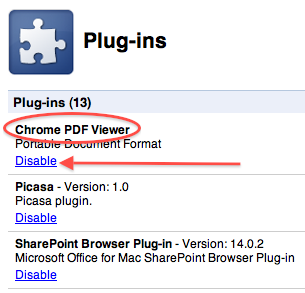
If you don’t like using the built-in Chrome PDF Viewer, you can disable it and go back to doing like you did before.

1. Open the Google Chrome Brower.
2. Go to the address bar and type in about:plugins.